Uncategorized

DNS SERVFAIL

Working on a Ubuntu 18.04 instance, and a specific client domain’s MX record kept returning SERVFAIL. Example:

dig clientdomain.ca -t mx

Would return:

When trying:

dig client domain.ca -t mx @1.1.1.1

The result would return fine. All other tested domains worked fine without specifying NS 1.1.1.1

This led me to believe that there’s an issue with systemd-resolve cache. I ran through a series of tests starting with flushing the cache, all with no success.

I was able to find a work-around by bypassing the local 127.0.0.53 DNS cache and changing the symlink to the conf by:

~$ ls -al /etc/resolv.conf

lrwxrwxrwx 1 root root 39 Oct 3 16:43 /etc/resolv.conf -> ../run/systemd/resolve/stub-resolv.conf

sudo rm -i /etc/resolv.conf #remove old symlink

sudo ln -s /run/systemd/resolve/resolv.conf /etc/resolv.conf #recreate symlink

The dig requests now responded properly, but I wasn’t satisfied with the solution. WHY was the cache failing. Upon further investigation, and I clearly missed it, looking at the MX record result shows:

;; ANSWER SECTION:
clientdomain.ca. 1800 IN MX 20 mx2-us1.hostedemail.com.
clientdomain.ca. 0 IN MX 10 mx1-us1.hostedemail.com.

See it? TTL 0. The systemd-resolve cannot cache a TTL 0, so it shows SERVFAIL.

Solution: client has changed their TTL.
QuickBooks Database Server would start and immediately exit

Been fighting with a QuickBooks database server that wouldn’t start. Frustrating. Event viewer is showing:

Incorrect function.

QuickBooksDB33
Could not start server

Was also showing SQLANY64 17.0

Turns out it was a port conflict with the DNS Server. Fix is:

     a. Stop the DNS Server service, and the QuickBooksDB## service.

     b. Reserve the port using an elevated command prompt: netsh int ipv4 add excludedportrange protocol=udp startport=55368 numberofports=5

     c. then start both services

New Logitech mouse has sporadic movement

Found this gem online:

https://answers.microsoft.com/en-us/windows/forum/all/solved-wireless-logitech-keyboard-mouse-acting/677f0e3c-9055-479f-8bc0-3b2023efc57b

I just wanted to share a solution to a problem that I was having with both of my Wireless Logitech Keyboard/Mouse combinations.  I would randomly have my wireless Logitech keyboard and mouse become erratic and either not work in the case of my keyboard or erratically in the case of my wireless mouse.  I had this problem on both my new Dell Windows 10 and older Windows 7 computers.  After much troubleshooting I discovered that there is a Logitech device driver that was causing the problem.  Here is what I did to fix it.  I don’t know if this will help anyone else, but, with problems like this pretty much anything is worth a try.

   1.  Open “Device Manager” from the Start menu.

   2.   Go down almost halfway down the list on the left hand side until you find “Human Interface Devices” and then click on it

   3.  Look for and click on the “Logitech USB Input Device” icon

   4.  Click on the “Power Management” tab

   5.  If the check box “Allow the computer to turn off this device to save power” is checked uncheck it.

That fixed my problem.  Hopefully, this will help someone else.

PuTTY to AWS

Well, that was a frustrating experience.

I’ve been running AWS instances for 8+ years and am a CCSP, Cloud Computing Security Professional.

A few days ago I tried to spin up a new Ubuntu instance in a new AWS region. Did the all the steps that I usually do including generating new keys for that region. Every time I would try to SSH in to the server, I kept receiving: “Server Refused Our Key”.

I made new keys. I spun up new instances with new settings. I tried different usernames. I converted keys from .ppk to .pem. Nothing worked.

And then I found a little snipped on askubuntu.com that said to upgrade from PuTTY 0.76 to PuTTY 0.77. And now it works.

Lenovo Reseller Authorized

For whatever computer needs that you have, Gilson Technologies is now an authorized Lenovo reseller. We have access to thousands of products including Lenovo, but can get most other hardware and software that you need.

Aorus X570 Elite Motherboard

Sometimes I like to leave little notes to myself. This is one.

If you come across another Aorus X570 Elite Motherboard that won’t boot, find “Power loading” (Power load) settings in the bios. The default is Auto, so change it to Enable. After making this change, the motherboard has started to post without issues… so far.

But it was a free phone app!

Talking to a friend today, they had no idea their personal information is constantly being exposed. As a privacy advocate, I need to educate more.

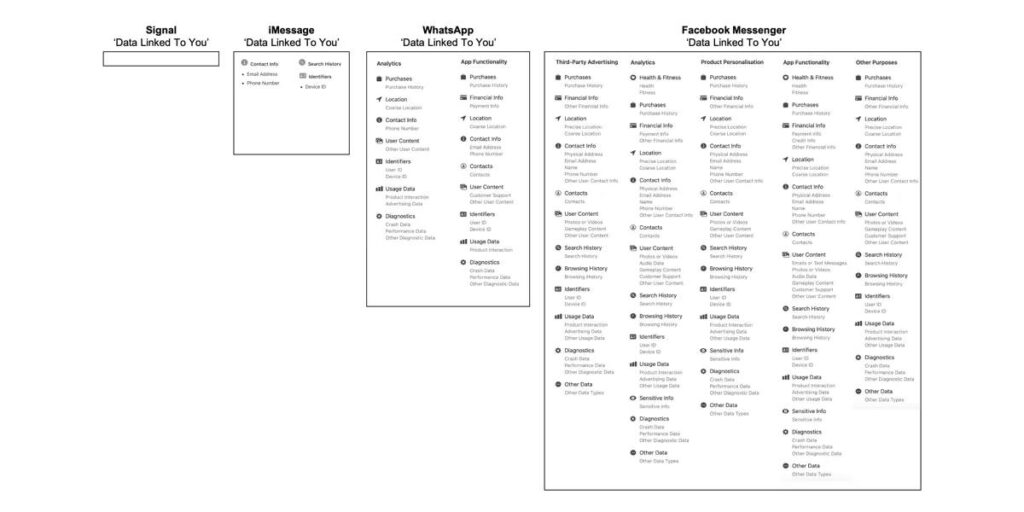
I’m alarmed and terrified at the data collected by the social media giants under the guise of providing you with “more relevant ads”. People need to know this. People need to care. If you haven’t been following it, Facebook and Apple are at odds over Apple’s decision to increase user privacy. In 2020, Apple introduced “privacy labels” in their app store that are similar to nutrition labels on food. The privacy labels are to explain what data is being accessed and why. For example, if you use Facebook Messenger, please look at what the privacy label says is accessed on your phone in this article: https://9to5mac.com/…/app-privacy-labels-messaging-apps/. Also, check the image below.

Let me highlight what Messenger accesses:
Purchase History
Other Financial Info
Precise Location
Physical Address
Email Address
Name
Phone Number
Other User Contact Info
Contacts
Photos or Videos
Browsing History
Search History
User ID
Device ID
Health Information
Etc.

Let me ask you this, why does a messaging platform need access to your address? Your purchase history? Your location? Your health info? If I want to send a message to my beautiful bride, how does my purchase history play any part of that?

Please read this Forbes article, aptly titled, “Yes, You Should Stop Using Facebook Apps On Your iPhone”, (https://www.forbes.com/…/why-you-should-stop-using…/). This applies to Android devices as well, but you’re against double odds there as Google is also collecting the same information and possibly more. The Forbes article addresses that with, “Google is much more silent on Apple’s changes—it sits both sides of the fence, after all.” Google makes the Android operating system AND is raking in huge amounts of personal data that it sells. If Google tightens the privacy in the Android operating system, it reduces the amount of data available to sell.

My biggest concern is what is being done with this data that is collected, and who polices it. Sure your ads may be more relevant, but does it matter to you? The Forbes article writes, “On every level, however it’s judged, Facebook collects and processes too much of our data. There is no balance, there are no checks or balances, its business model is so entrenched that it can’t seem to rethink the basics despite the constant backlash.” Does Facebook have a handle on the data they collect? Look up the Cambridge Analytica scandal as just one example. Something else that people don’t realize is that your data is also being sold.

What is the value in selling your data? When you download a free app on your phone, why is it free? Do you believe that a team of programmers spent a year or more developing an app to simply give it away? Those teams are paid by revenue generated by advertisers who purchase your data that is collected via data brokering services. Your personal information is the end product.

Some insight in to my next rant? If you have your location services enabled, the data brokers can tell where you live and where you work. They know where you shop. SkyHook (https://www.skyhook.com/) should scare you. Do you have the Weather Network on your phone? Does it conveniently tell you the weather wherever you are? It’s selling your data. https://www.cbc.ca/…/weather-network-addictive-mobility…. And that article is from 2017.

Folks, watch what you put on your phones. Delete your unused apps. Tighten your privacy settings. Watch those privacy labels. And share this info.

Do I wear a tinfoil hat? No. Am I worried about our loss of privacy? Yes. You should be too.

AWS Route53 CNAME not working

Spent a few hours sleuthing a client email issue today as their postfix server was unable to deliver email. Postfix rules appeared ok and the email would eventually be delivered within 1 to 2 hours.

Postfix was reporting: “Host or domain name not found. Name service error for name=emaildomain.com type=AAAA: Host not found”

Explored the option that possibly BIND was trying to use IPv6 because of the AAAA notification. Looked through their server config and IPv6 is disabled. Possibly BIND is still trying to access IPv6? That was a dead end.

From a teminal:

nslookup emaildomain.com

Would return as NXDOMAIN.

Looked in to routing issues with AWS and BIND and why the AWS DNS servers were not responding properly. Set the BIND forwarders to forward to OpenDNS as well as Google’s 8.8.8.8. Still nothing. Externally the domain resolves fine, internally BIND is not able to resolve the domain. Why?

Turns out the FQDN that we were pointing to is a CNAME to an AWS Network Load Balancer. As per Route53 documentation (https://docs.aws.amazon.com/Route53/latest/DeveloperGuide/routing-to-elb-load-balancer.html), “To route domain traffic to an ELB load balancer, use Amazon Route 53 to create an alias record that points to your load balancer. An alias record is a Route 53 extension to DNS. It’s similar to a CNAME record, but you can create an alias record both for the root domain, such as example.com, and for subdomains, such as www.example.com.”

Removing the CNAME that we were routing to and replacing it with an alias record solved the issue for internal access, and it’s quicker for external look ups as there is no longer a double looking CNAME, and then resolve CNAME to IP. As a bonus, the Route53 record creation tool walked through the set up beautifully and was straightforward connecting the NLB.

Problem solved!

Phone Scam

Just never know what’s going to roll across a client’s desk, but in this case, it was my desk. I was in a meeting and voice mailed a call on my home phone. (Yes, I’m that old that I still have a home phone). Here’s the call:

https://gilsontech-public.s3.ca-central-1.amazonaws.com/Friday_07-24-2020-Fraud-Call.wav

Sounds alarming!

First thing to note: it’s a recording that’s leaving a recording. Visa would never do that. So why call? If I answered and pressed any number, they would connect me to a live person who would want to verify my information. Most likely they have my credit card number but do not have the CVV. Without the CVV, the number is useless. Or, maybe they do not have my credit card number and they are trolling. Hard to say. Be aware everyone, the scammers are out there.

More info here and some great security practices here: https://www.greedyrates.ca/blog/rcmp-warns-of-new-credit-card-scam/

Stay safe,

  • Al

HikVision DS-76xx and NO-IP

Had a client that was having issues keeping their IP address updated with their office NVR. Side note, a static IP would have been easier.

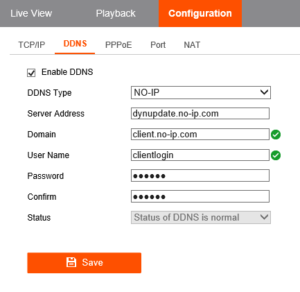
With their HikVision DS-76xx box using NO-IP, we could not get the system to connect to the NO-IP host to update. Settings are:

HikVision - NO-IP DDNS

We re-entered the username, the server address, the password, the domain, all without any success. Kept seeing: “connect to server failed”. The problem? Password was too long. I preach password security, but by shortening the password we were able to get it working. We had to change password to the account on NO-IP.com first, the NVR second, and a quick reboot and we were back up and running.

Scroll to top